Trusted Adviser in Information Technology & Business with a focus on Native American success. IBMer, Tribal Business Expert, STEM Educator, and Fly-fisher!
I recently connected with a friend on twitter (@tlcgoodluck) and found out she works at the Native American Community Academy (NACA) in Albuquerque, NM. My family and I were invited to a Maori performance at the school on 5/13/2010 (these performers traveled all the way from New Zealand). We went and it was a great visit, I learned that many of the students at the school are from the surrounding tribes in NM and that a couple of the teachers were from Laguna Pueblo. The real goal for my visit was to meet with the science/math teachers so I can present about engineering/business/career to the kids in the future. It was a great afternoon seeing all the students, talking with several teachers, and watching the performance. Here a brief video of the Maori visit. Enjoy!
– Dom
* For better video & audio quality watch the 720p HD version.
The Laguna Public Library (in Laguna, NM) periodically holds events for the public that help promote & preserve the local culture. This last Monday (5/10) the library had “Laguna Storytelling” with Chris Luther. This hour long event was great re-introduction to the Keres language for me personally. I was very appreciative that the library and Chris allowed the event to be recorded. This video is just a small sample of what occured, the full video will be put on the computers in the library for others to also enjoy the event.
– Dom
* For better video & audio quality watch the 720p HD version.
Since I’ve had several questions recently about what Audio & Video gear I use, I’ve decided to create a separate page here on this blog to detail what I own & what I have used. Feel free to contact me about any of the items listed, maybe I can save you some time/energy in your various content capturing/creation efforts.
In addition, I would like to point you to an awesome resource I found during 2009 PodCampAZ for learning more about the technical aspects of video. His name is Israel Hymen, he runs Izzy Video, and I’m a member.
The SanDisk Sansa Clip Plus MP3 player has been very useful to me for capturing mobile audio and I’ve decided to write about it so others know about this useful little device.
I use the voice recording function of this MP3 player to capture presentation audio by placing (actually cliping) the device on the shirt of the person doing the presenting. By doing this I get the built in (omnidirectional) microphone very close to the audio source (person’s mouth) which greatly improves audio quality. This is the same microphone placement that makes professional wireless lapel microphones sound so good. The microphone is on the clip side of the device at the top, and since there are no wires the person is free to move around while talking. This device does employ a Automatic Gain Control (AGC) function, so it’s helpful if the presenter simply says something like 1 … 2 … 3 before really starting into their content. The AGC function is also helpful in capturing distant questions in the room.
All the audio is recorded to solid state storage inside the device (there are 2GB, 4GB, and 8GB models), the battery is self-contained (not removable) and can run up to 15 hours in playback mode. Record mode would be a bit less since the device is actively writing to storage, I have easily recorded up to 3 hours of audio at one time (I’m really curious to know how long it would record). Recorded audio consumes almost 3MB per 1 minute of audio, this means an hour of recording would take up about 180MB of space on the device, so even the 2GB model has plenty of space to do hours of recordings.
The Sansa Clip Plus records audio in WAV format (tech details are: 24kHz, 16bit, Mono = 384kbps, good enough for speech, not really good for music). I really like this particular file format because it allows for post-processing/editing. Recording devices that record directly to MP3 do not easily allow for this option without further loss of audio quality.
Here are the post processing steps I go through to get the best possible audio from this device.
1. I pull the files off the Sansa Clip Plus using the USB cable provided and copy the files to my computer (it just looks like another drive).
2. I use the Levelator software to enhance the WAV file before editing the audio (this software is free from the Conversations Network). The Levelator performs audio re-leveling on the entire file at a detail that is too manually intensive to do yourself. Here are some waveform examples captured from Audacity. If you want more detail on how this is done, please checkout the Levelator website.
This audio waveform is before running the WAV file through the Levelator:
This is the audio waveform after running the WAV file through the Levelator:
As you can see, some of the louder parts are reduced, and softer parts are enhanced. This is the magic of what the Levelator can do for your audio recordings.
3. I use the audio editing software Audacity (also free) to remove any unwanted audio parts (just highlight and delete). Once I have the audio in final form, I can then produce a MP3 file (there are steps to set this up on the Audacity website). I typically produce the MP3 file at 64kbps to keep file size down and still maintain a good quality sound.
Here are some samples of audio I recorded in the house (not the best since walls reflect sound).
Sample audio before using the Levelator at 64kbps (24 seconds):
Sample audio after using the Levelator at 64kbps (24 seconds):
Now I know the difference is subtle in these examples, and you might pickup the difference more if you use headphones. But the really nice thing about the Levelator software is the ability to amplify audio from sources that are distant to the microphone. If you want another example of this take a listen to the audio from my post “Engineering talk at SIPI”.
The title of this post is “Mobile podcasting hardware for less than $39.99” which means you can likely find the 2GB version of the device through a online retailer for less than the suggested retail price.
I hope this information was useful, I really like the SanDisk Sansa Clip Plus for mobile audio capturing and recording speeches/presentations. Just remember to re-charge the device before any long event recording.
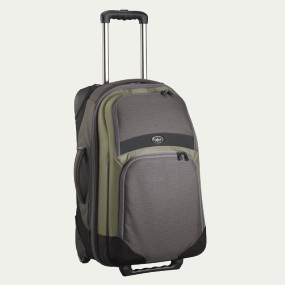
I’ve owned the Eagle Creek Tarmac ES 22 luggage for over a couple years now. It’s a great bag, fits well in all overhead storage on planes, and it’s light.
I wanted to make people aware of one issue I had with the bag, which I fixed. The allen screws on the handle tend to come loose with use over time. Since I did not want the handle coming off while traveling I kept screwing in the screws with whatever tool I had, a key, a stick, you get the idea.
I solved the loose screw problem at home one day by putting some Loc-tite on the screws so they don’t move. You can get Loc-tite at a local hardware store. One dab of this product on the threads does the trick, then securely tighten down the screw using a allen wrench.
Hope this is helpful to those folks who have the same bag.
– Dom
P.S. This post was created using the iPhone WordPress app while on a train to the airport, pretty slick.


 Dominic Pruitt