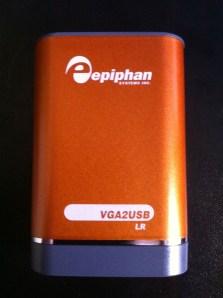
What is the Epiphan VGA2USB LR?

I recently purchased a Epiphan VGA2USB LR to record presentation video from workshops where multiple people present during the day.

This device is a frame grabber, it takes the VGA input from the computer and makes images, in fact it makes so many images that one can record video at 30 frames per second depending on the resolution.

I have found this device very nice to use with Camtasia.

The particular things I like are:

  • No software needs to be installed on the presentation laptop (this is huge!)
  • The ability to record what is being presented including software demos and videos (most local sw can’t record wmv video)
  • The ability to record a computer without impacting the computer itself, from a performance point of view (local screen recording can be compute intensive)
  • Can record wireless audio on a separate laptop

Here is how the video part is connected, speaker audio can be input to the recording laptop (Computer in this picture) via USB or Mic input.

Here is a youtube video of recording using the VGA2USB LR and Camtasia:

Direct youtube link – http://www.youtube.com/watch?v=R_qDaeeteRw

If you want a in depth review of this little device, check out this blog post by Victor, it even contains a device teardown to see whats inside.

Enjoy!

– Dom

My new fly fishing site … domflyfish.com

It’s taken a fair amount of work lately, I finally made the time and energy investment to create my own fly fishing website.

One of the motivations for creating it was to capture my experiences as I went out and to share them with others (I’m mostly doing this so my kids have a record of something their father loved).  This fly fishing website will be a little different, it will use different types of media like google maps with video & audio.

All future fly fishing posts will go there now.

Check it out at domflyfish.com and let me know what you think.

– Dom

Honor Flight AZ to Washington DC

I traveled to Gaithersburg, MD on Southwest Airlines today for work this week and was pleasantly surprised to run into a great group of people on a special trip.

There were about 80 people in the group and almost all of them had served in World War II.  The organization called Honor Flight Northern Arizona & Honor Flight Network is a non-profit that have been taking WWII veterans to Washington DC to see their own memorials.  Southwest Airlines also supports this organization.

Here is a bit of video I shot on the plane showing the fun time they had in supporting those that help provide for our freedom.

Too bad my grandfather (who came back from what went on in Bataan) is not around to enjoy something like this.

Thank you veterans for all that you sacrificed for our freedom!

– Dom

Direct youtube link:  http://www.youtube.com/watch?v=CcppV2aojFU

How to use VNC & Camtasia to record presentations/demos from other laptops

Sometimes there is a need to record the content of another presenter or a group of presenters, and installing Camtasia on each and every laptop is not practical.

I’ve also seen this solved by using a “presentation” laptop, and often there are issues with the presentation & certain versions of presentation software or fonts or formatting.  I’ve done this once and at the end of the recording one presenter was confused with what was seen on the screen, did something and subsequently deleted the recording before I could get to the laptop to save it.

Another solution to this (and one of the more ideal) is through various pieces of hardware like VGA splitters and Frame Grabbers to go along with laptop and projector.  I’ll do a separate post on this later.

One of the more inexpensive solutions to recording content on a remote laptop is to use remote desktop software, in most cases I use VNC since I can connect to Windows, Mac, and Linux based laptops (it’s also free from realvnc.com, though this version does not have encryption).  My other choice when using Windows only is to use remote desktop.

All of this screen capturing is done over a wired or wireless TCP/IP network, and requires a fair amount of bandwidth on the local subnet.  If you were to do this across the internet or intranet, the latency of screen refreshes goes up which could impact the live recording and slow down the presenter.

Below is a little video I put together to summarize what I’ve done with VNC and Camtasia (PC & Mac setup/demos).  In addition I’ve included pictures of my wireless audio setup to capture the audio at the same time as the video.

The hardware pictured is of a Shure PGX wireless microphone system connected via a XLR cable to a Centrance MicPort Pro pre-amplifier which then connects USB to the laptop and appears to the system (and Camtasia) as a external microphone.

Enjoy the video!

– Dom

Direct link to video:  http://www.youtube.com/watch?v=HK2bjqgm1Cs

Record in 3’s

One of the challenges of recording any kind of content (video or audio) to be distributed on the internet or a intranet is getting a good natural sounding “take”.

I came across this nice Camtasia audio article by Lon Naylor on capturing multiple attempts of the same audio to get a really natural “take” to be mixed or added to a longer audio sequence later.  The included youtube video is a great example of this (I’ve also included this video below).  The video also shows great microphone and pop filter placement.

This makes a lot of sense, once a person reads a script and gets comfortable with the content or phrase, repeating it will sound more natural the next time (also any nuances or word emphasis would be worked out by hearing yourself).  By the 3rd attempt it should sound good.

Thanks for the article and pointer to the youtube video Lon.

Enjoy!

– Dom

Direct link to video:  http://www.youtube.com/watch?v=t926G1FFzL4